
Factory Reset Your Garmin Watch: A Step-by-Step Guide
As an avid Garmin watch user, you may encounter situations where your device experiences glitches or software issues. While minor problems can often be resolved through troubleshooting, sometimes a factory reset is necessary to restore your watch to its pristine condition.
In this comprehensive guide, we’ll walk you through the step-by-step process of factory resetting your Garmin watch. By following these instructions carefully, you can restore your device to its default settings, erase all data, and resolve any persistent issues you may be facing.
Whether you’re experiencing slow performance, battery drain, or other technical difficulties, a factory reset can be a valuable solution. So, let’s dive right into the details and empower you with the knowledge to factory reset your Garmin watch like a pro!
Table of Contents
How to Factory Reset your Garmin Watch: A Step-by-Step Guide
- Back Up Your Data: Before you reset your watch, it’s important to back up any important data, such as activity logs, settings, and workouts. You can do this using Garmin Express or the Garmin Connect app on your smartphone.
- Power Off the Watch: Hold down the power button until the watch turns off.
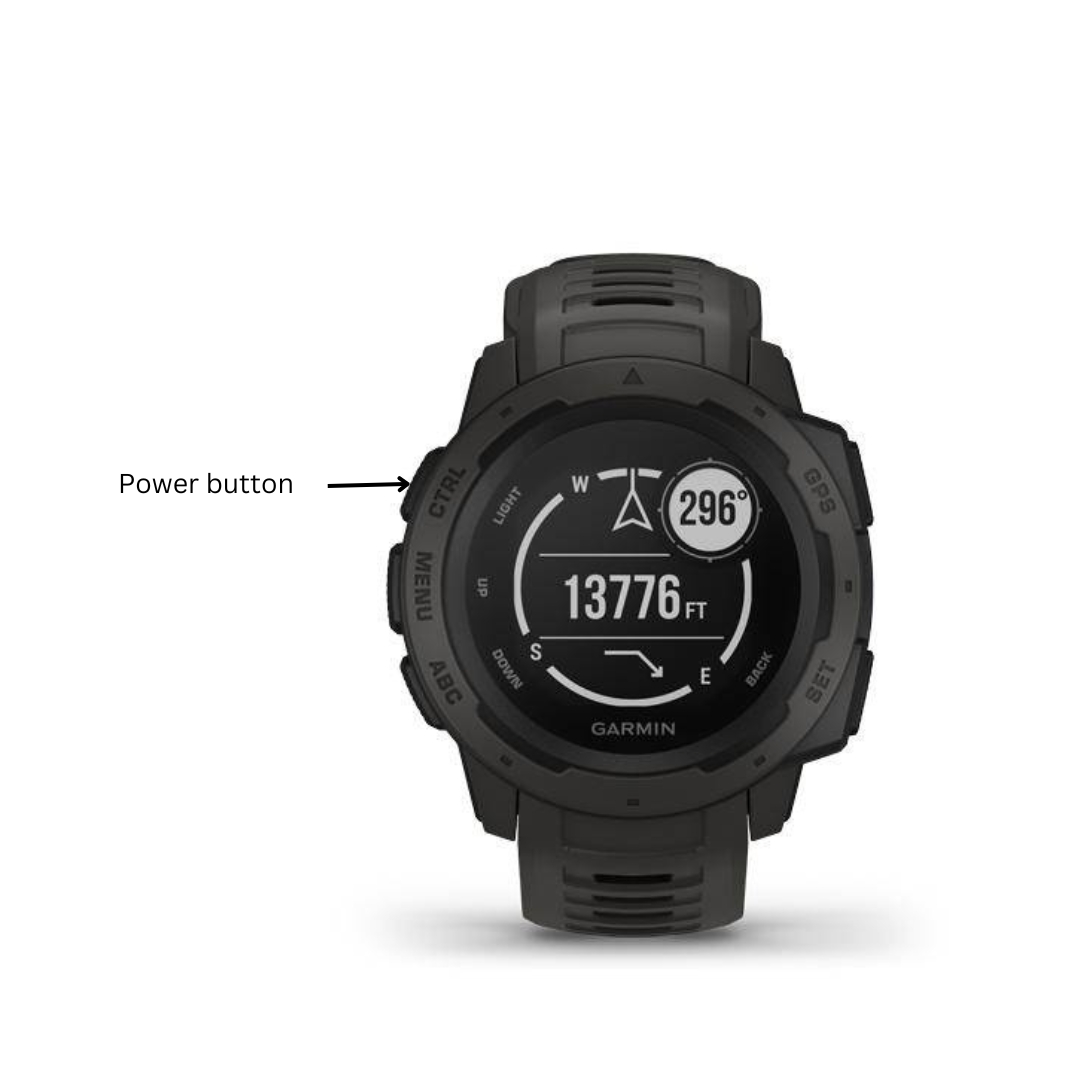
- Hold Down the Buttons: Simultaneously press and hold the following buttons:
- Power button
- Back button
- Down button
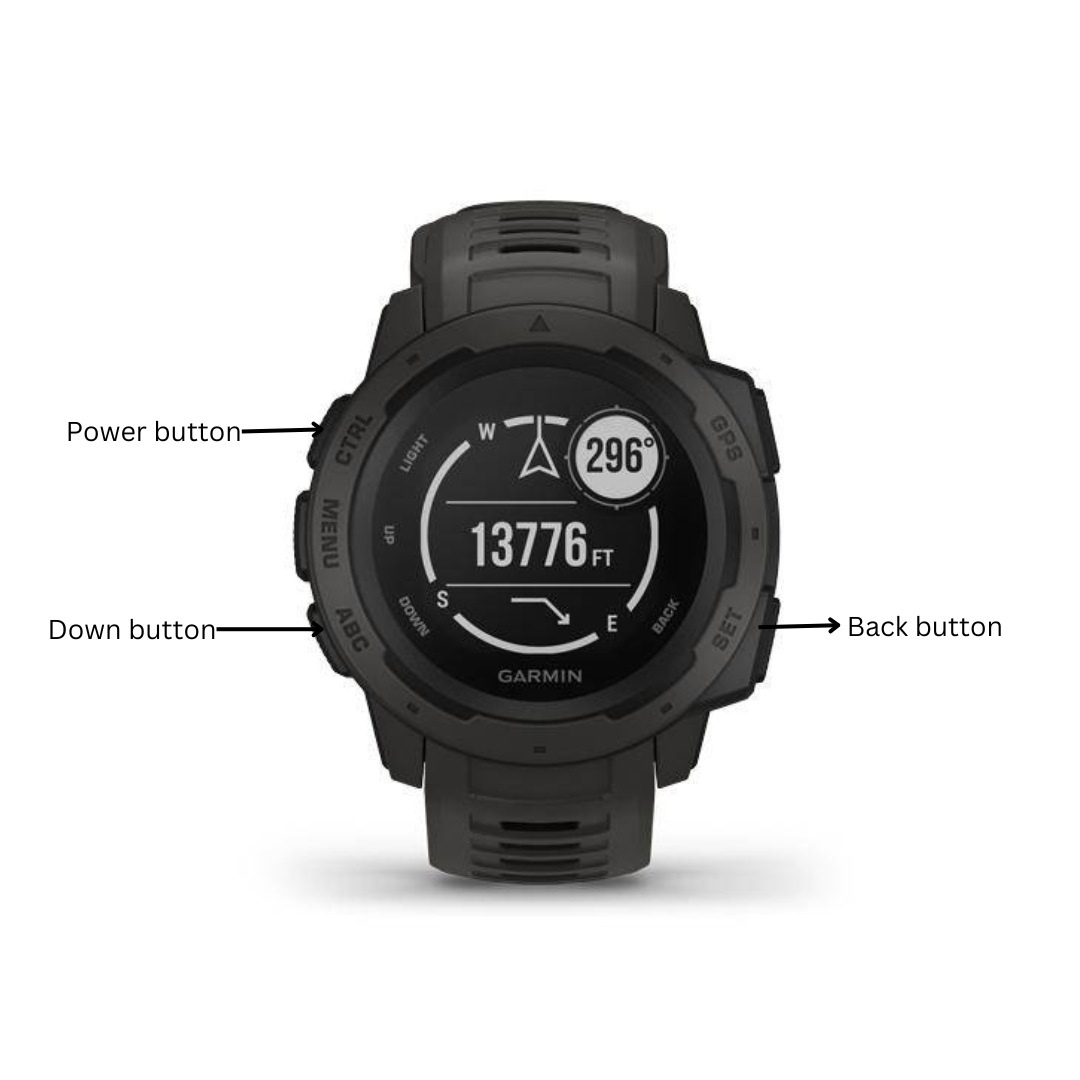
- Wait for the Reset Screen: Hold the buttons until the watch displays the “Reset” screen.
- Select “Yes”: Use the up and down buttons to navigate to “Yes” and press the power button to confirm.
- Wait for the Reset: The watch will now reset to its factory settings. This process may take a few minutes.
- Set Up Your Watch: Once the reset is complete, you will need to set up your watch again. This includes connecting it to your smartphone, setting up your profile, and choosing your desired settings.
Unlock the Power of a Factory Reset: Enhance Your Garmin Watch Experience
Factory resetting your Garmin watch can unlock a plethora of benefits, revitalizing its performance and enhancing your overall user experience. Here’s how you can reap the rewards of a successful factory reset:
- Improved Performance and Speed: A factory reset wipes away temporary files, glitches, and outdated software, restoring your watch to its original factory settings and optimizing its performance. You’ll notice faster boot times, smoother navigation, and enhanced accuracy in tracking and data recording.
- Elimination of Bugs and Glitches: A factory reset can eliminate any software issues that may have been causing bugs or glitches, providing you with a stable and reliable user experience.
- Resolve Connectivity Issues: A factory reset can help resolve connectivity problems with your smartphone or other Bluetooth devices by resetting the watch’s network settings and establishing a fresh connection.
- Clear Unwanted Data and Cache: A factory reset clears accumulated data and cache, freeing up storage space for important updates and new features.
- Prepare for Updates and New Features: A factory reset creates a clean environment for installing software updates, ensuring successful updates and access to the latest innovations from Garmin.
- Enhanced Security: A factory reset removes any unauthorized apps or modifications that may have compromised your device’s privacy or performance, restoring your watch to its original security settings.
Wrapping Up: Enjoy a Refreshed Garmin Watch
By following the detailed steps outlined in this blog post, you have successfully factory reset your Garmin watch. Now, you can enjoy a fresh, glitch-free device that’s ready to track your fitness progress and navigational adventures with renewed accuracy.
Remember, while factory resets are often necessary to resolve technical issues, they also erase all your stored data. Therefore, it’s crucial to back up your watch regularly to prevent data loss. With a clean slate and a reliable backup system in place, you can confidently explore the great outdoors and pursue your fitness goals with your Garmin watch as your trusty companion.
We have also created a guide to show you how to Reset your locked Apple Watch.

My name is Oje and I’m obsessed with finding the latest tech gear to help people track progress and solve problems more efficiently. I spend countless hours researching and testing innovative apps, wearables, and devices for fitness, health, productivity, and more.