Skip to content

HikersFitnessGear

Trail Guides, Fitness, Outdoors & Gear Insights

Menu
  • Home
  • Blog
  • Trail Guides
    • Hiking guide
  • Hiking Gear
    • Hiking Gears
  • About Us
Menu
image showing how to reset your apple watch series 7

How To Reset Your Apple Watch Series 7

Posted on May 3, 2024

If you’re experiencing issues with your Apple Watch Series 7 or planning to sell or give it away, you may need to reset it to factory settings. Resetting will erase all content and settings, returning the watch to its original out-of-the-box state. Here’s how to properly reset your Apple Watch Series 7.

Table of Contents

  • Force Restart First
  • Erase All Content and Settings to Reset your Apple Watch Series 7
  • What Next?
    • Unpair From your iPhone
    • Pair and Restore as New
    • Reset As a Last Resort

Force Restart First

Before resetting, it’s recommended to first force restart your Apple Watch. This can sometimes fix minor software glitches. To force restart:

  1. Press and hold both the Digital Crown and Side button simultaneously for around 10 seconds.
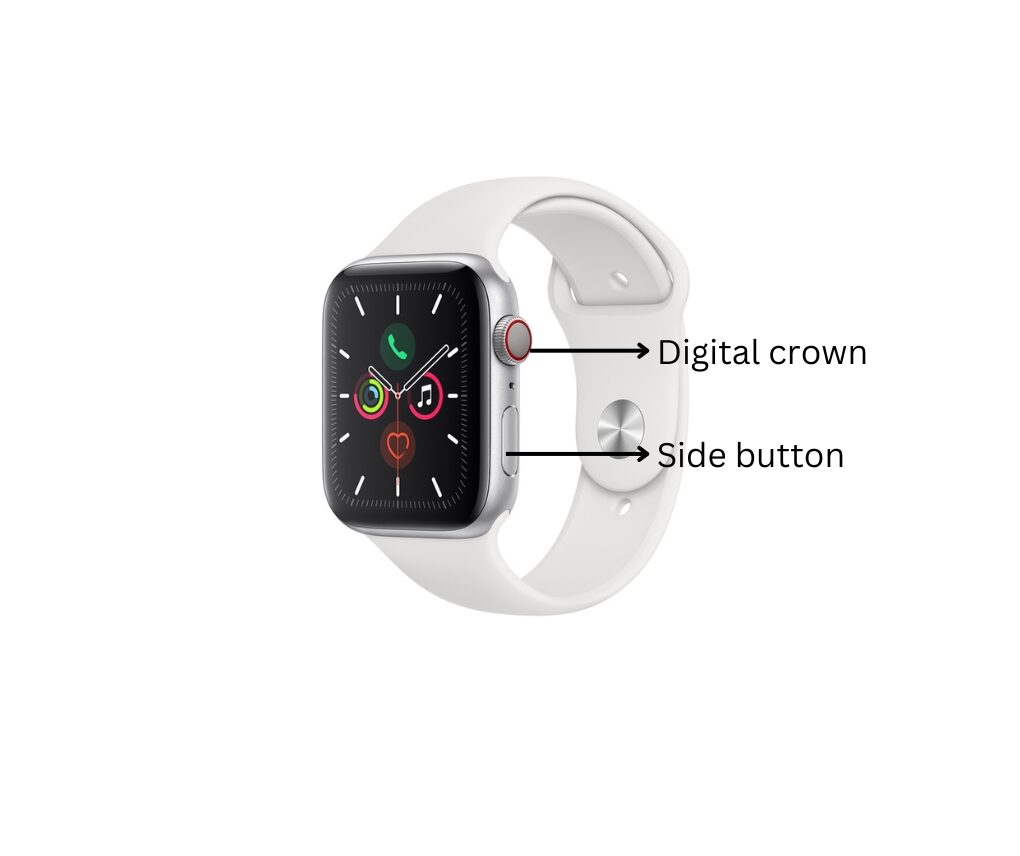
    Image showing how to reset your apple watch series 7
  2. Release both buttons when you see the Apple logo.

Erase All Content and Settings to Reset your Apple Watch Series 7

If a force restart doesn’t resolve the issue, you can erase all content and settings to factory reset.

  1. On your Apple Watch, open the Settings app.
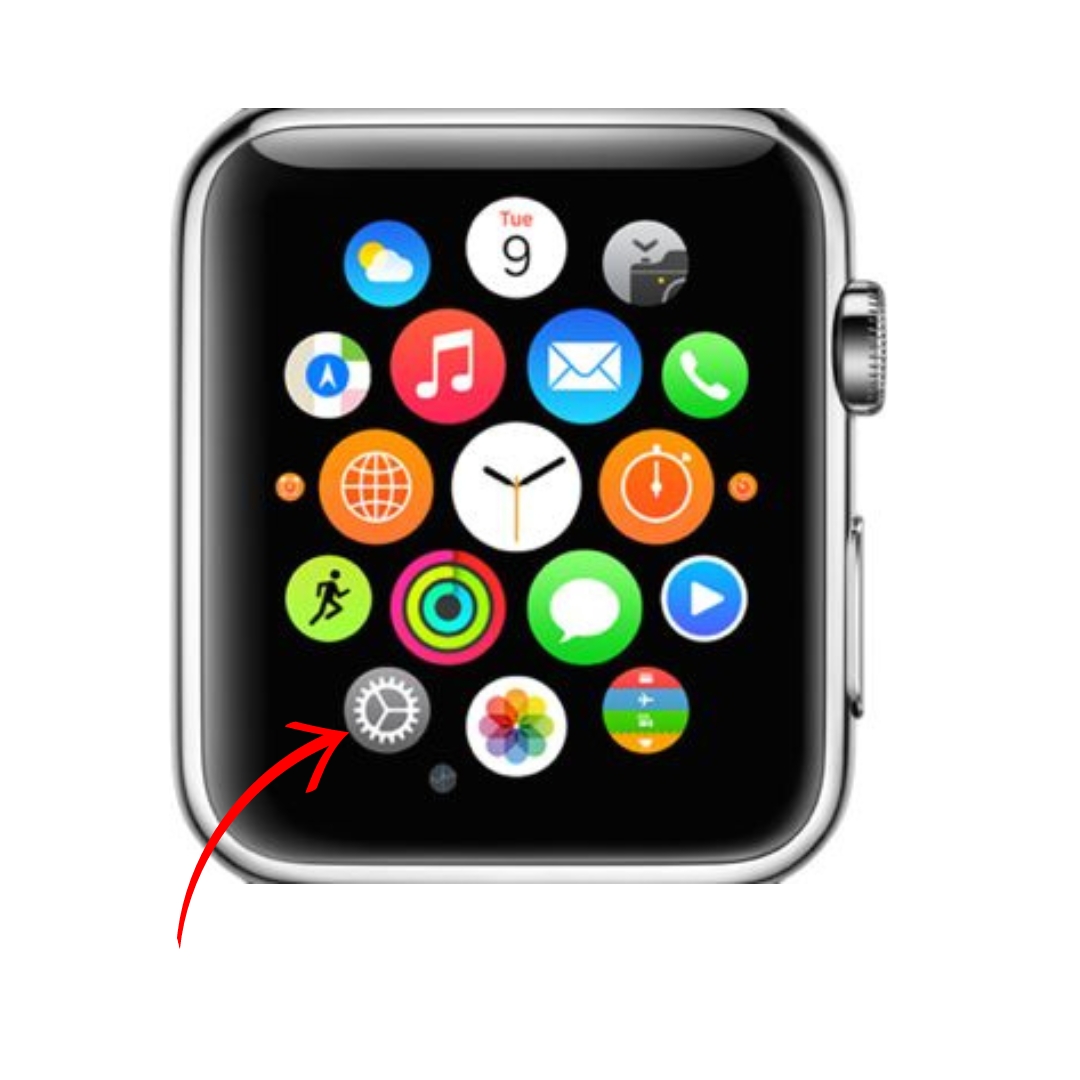
    Image showing how to reset your apple watch series 7
  2. Tap General > Reset > Erase All Content and Settings.
  3. If prompted, enter your password.
  4. Tap Erase All to confirm.

This will completely reset your Apple Watch Series 7, deleting all data, apps, settings, and customizations. The process may take several minutes.

What Next?

Unpair From your iPhone

After the reset, you’ll need to unpair the Apple Watch from your iPhone.

  1. Open the Watch app on your iPhone.
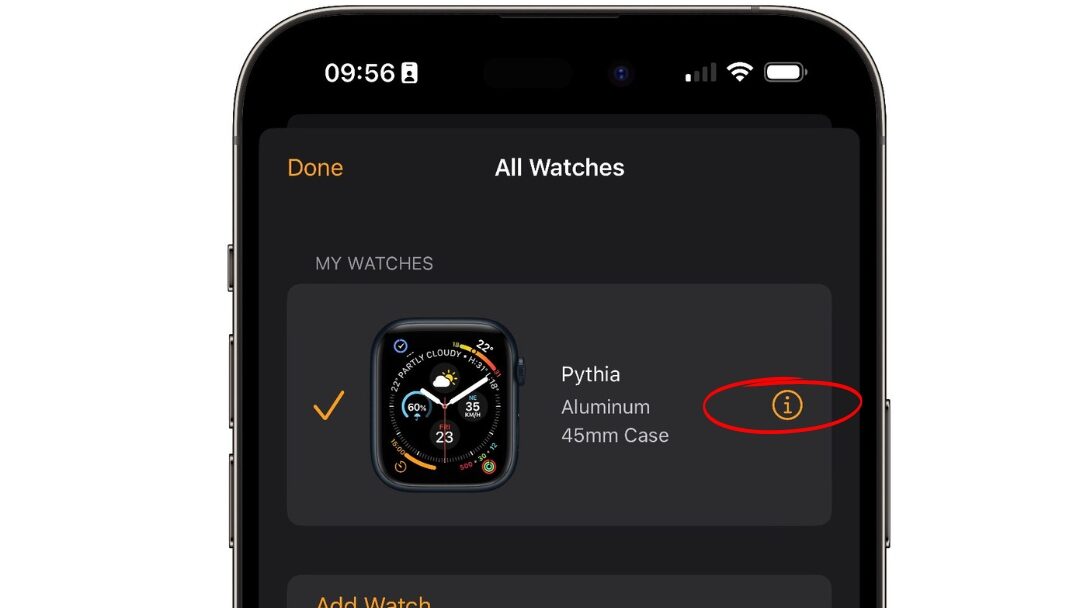
    image showing how to reset your apple watch series 7
  2. Tap the My Watch tab, then tap your watch at the top.
  3. Tap the “i” icon next to the watch.
    image showing info button and how to reset your apple watch series 7
  4. Tap Unpair Apple Watch.
  5. Enter your Apple ID password if prompted.
  6. Tap Unpair again to confirm.

Pair and Restore as New

Once unpairing is complete, you can set up your reset Apple Watch Series 7 again as new.

  1. Keep your iPhone near the watch and follow the pairing prompts.
  2. Choose to set up as a new watch or restore it from a backup.

After resetting and re-pairing, your Apple Watch will be just like new and ready to use again!

Reset As a Last Resort

Only reset your Apple Watch if you’ve exhausted all other troubleshooting steps or before selling or giving it away. Resetting will permanently delete all personal data. As always, make sure to create a backup beforehand if you wish to restore data later.

hikergear admiin
Oje Ebhota

My name is Oje and I’m obsessed with finding the latest tech gear to help people track progress and solve problems more efficiently. I spend countless hours researching and testing innovative apps, wearables, and devices for fitness, health, productivity, and more.

Leave a Reply Cancel reply

Your email address will not be published. Required fields are marked *

Recent Posts

  • Angles90 Grips vs Standard Pull-Up Handles: Which Is Better for Your Joints?
  • How to Shoot Drone Photography Safely and Responsibly on Hikes
  • Naturehike Mongar 1 UL Review: The Roomiest Solo Tent on the Market?
  • Finding Easy Walking Paths & Trails Near You using AllTrails Filters
  • Winter Landscape Photography: Protecting Batteries and Exposure in the Snow

Recent Comments

  1. Naturehike Mongar 1 UL Review: The Roomiest Solo Tent on the Market? - HikersFitnessGear on Forest Photography in Overcast Weather: Turning Dull Light into Moody Woodland Shots
  2. Sunset Watching Escapes: How to Find the Best Golden Hour Spots Near You on 5 attractions for visitors with Tom’s Thumb Trail Scottsdale AZ Nearby
  3. How to Deal with Loneliness on Extended Solo Trips on Solo Snowshoeing for Beginners: Safe Winter Travel Beyond the Groomed Paths
  4. Winter Micro-Adventures: How to Get Quick Outdoor Wins in Freezing Weather on How to Make a Campsite Afternoon Tea Routine (The Ultimate Unwind)
  5. Giling UL 4-Season Tent Review: Winter Backpacking Perfected - HikersFitnessGear on Essential Gear: 5 Reasons Waterproof Hiking Shoes Dominate Outdoor Adventures

Archives

  • September 2026
  • August 2026
  • July 2026
  • June 2026
  • December 2024
  • June 2024
  • May 2024
  • April 2024
  • March 2024

Categories

  • Apple Watch
  • Blog
  • Fitness Watch
  • GPS Watch
  • Health gear
  • Health Watch
  • Hiking Clothes
  • Hiking gear
  • Hiking Gears
  • Hiking guide
  • Hiking Shoes
  • Luxury Watch
  • Waterproof Hiking Shoes

Subscribe to my Newsletter

Stay ahead with exclusive updates, insightful tips, and exciting news delivered straight to your inbox.

Terms of Service

Privacy Policy

Contact Us

Affiliate Disclosure

©2026 HikersFitnessGear | Design: Newspaperly WordPress Theme